
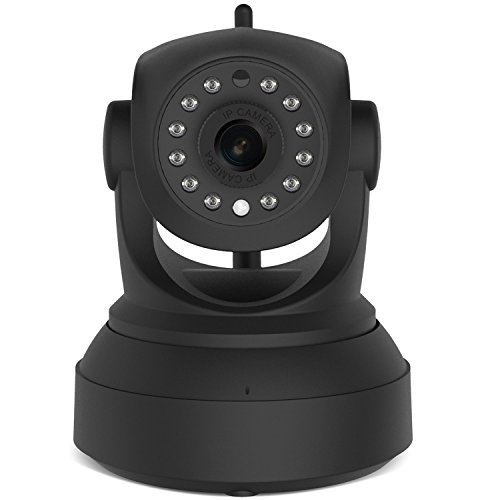
Wireless Camera, 720P IP Camera Built-in Microphone with 2-Way Audio P2P Onvif Baby Monitor Nanny Cam, Night Vision Security Camera
Product Description
Wireless Camera, 720P IP Camera Built-in Microphone with 2-Way Audio P2P Onvif Baby Monitor Nanny Cam, Night Vision Security Camera
- Two-way Audio: Built-in speaker and microphone, not only can you see what is happening in front of your camera, also you can hear and speak. Tell your dog to get off the couch or tell intruders that the police are on the way.
- Great Features: Wide Angle With Pan Almost 360 degrees (Horizontal) and Tilt 80 degrees (Vertical) and you can add a few these cameras on the app, view 4 live streams on the phone app or 64 live streams on PC at the same time.
- Setup is a brezze: Quick WiFi setup via iOS or Andriod smartphone using Eye4 app. Remote access to the camera on Smartphone, Tablet, Mac or Windows PC via iOS or Andriod smartphone using Eye4 app. Remote access to the camera on Smartphone, Tablet, Mac or Windows
- Motion Detection: Get informed about every movement in your house via E-mail, FTP or store the alerts on Micro SD. The motion detection sensors "feel it" when something is moving in the room and will let you know at once. Perfect for surveillance!
- Night Vision: Built-in IR LEDs with the 8m IR distance allow you viewing and recording live video even in complete darkness, Support recording on SD card up to 64GB (Regular Size).
Key Features
â–¶ 720P HD video, H.264, MPEG4, MJPEG configurable streams.
â–¶ Windows & Mac compatible, Free viewing software for PC.
â–¶ Free Apps for iOS and Android, view and hear remotely from anywhere.
â–¶ Infrared night vision to 8 metres.
â–¶ Automatic IR filter for true day/night video.
â–¶ Micro SD DVR (supports up to 64GB).
â–¶ Motion record/alerts via Push Notifications/Email/FTP.
Quick Connect with Wifi
â–¼ 1. Plug in camera power.
â–¼ 2. Connect with wifi to your phone.
â–¼ 3.Click "Add Camera"
â–¼ 4. Choose wireless configuration: please refer to " the wireless installation instruction " and "APP voice prompt" to operate.
â–¼ 5. Please keep the phone and camera distance within 2 metersï¼›
After about 15s, camera will speaks" WiFi configuration success", click add it.
â–¼ 6.Input camera password 888888,click ok, then Click "Add it".
â–² Note
â–¡ 1. The camera will not work on a 5G WIFI at this time. If you have a dual-band router, be sure to segregate your wireless channels and connect the camera to the 2.4ghz channel.
â–¡ 2. The camera can record to an internal MicroSD card (up to 64g) which is not included in the package.
â–¡ 3. The user is admin and the password of camera is: 888888.
Package
1xIP camera
1x Power Supply
1x Quick Start Guide
1x Wall and Roof mount
2 x Screws / Fittings
Technical Specifications
You might also like
TOP CASE-4 in 1 Matte Hard Case,Keyboard Cover,Sleeve Bag,Screen Protector Compatible with Old MacBook Pro with Retina Display Model A1425 and A1502 - Light Pink

Oberton Pro “Tatysh” Jaw Harp (Russian Vargan) in protective cedar case - Modern incarnation of tribal music mouth instrument

LHinsights Princess Castle Play Tent with Large Star Lights, Large Indoor and Outdoor Pink Kids Pretend Playhouse for Girls

Essentials of Public Health (Essential Public Health)

SUKER 3 in 1 SD/ Micro SD Card Reader with Type-C/ USB 2.0/ Micro USB Plug & OTG Fuction for PC Cell Phone New MacBook (Black)

Scottish Terrier v2 counted cross stitch kit

TaylorMade Rossa Maranello Tour 1-02 Putter Stock Steel Shaft Steel Right Handed 34.5 in
ammoon Meideal TCapo20 Quick Change Key Capo Tuner for Acoustic Electric Guitar Bass Chromatic