
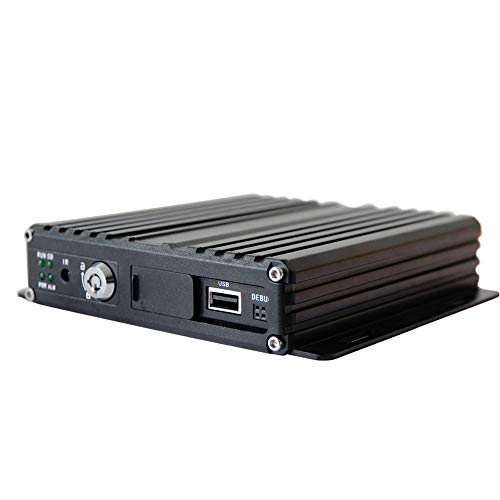
herchr sd Card Vehicle 720P AHD GPS 4G 4ch sd Card Vehicle Mobile dvr with Hisilicon chip
Product Description
herchr sd Card Vehicle 720P AHD GPS 4G 4ch sd Card Vehicle Mobile dvr with Hisilicon chip
- Built-in high performance Hisilicon chipsets, coded with H.264 standard, high compression rate and image qulity 4CH AV Inputs with AHD 720P/960H/D1/CIF optional, 1CH synchronized AV output, 1CH VGA output 4CH local recording with 720P resolution in real time
- You can connect the camera with the AV input cable directly, or by extension cable (optional). The AV cable in the accessories box has mark on each connector, AV 1-4 are for cameras connection
- Smart power management system, shutdown under low voltage, low consumption when standby
- Monitor connection.: The device supports VGA and CVBS output. You can switch the output mode to be the one you need by the mouse or remote control.
- 100% RISK-FREE SATISFACTION GUARANTEE : Any problem, please contact us at the first time. We promise to give the customer 100% SATISFACTION GUARANTEE and one year warranty.
Power:
 Professional In-Vehicle power design, 9-32V DC Wide Voltage Range
 Multi protection circuits like under-voltage, short, reversed plug-in
 Smart power management system, shutdown under low voltage, low consumption when standby
Data Storage:
 Special file management system to encrypt and protect the data
 Proprietary technology to detect the bad track of the SD card which can make sure the continuity of video and long service life of the SD card
 Built-in ultracapacitor, avoid data loss and sd card damage caused by sudden outage
 Support SD card storage, maximum 256G
Transmission Interface:
 Support GPS/BD optional, high sensitivity, fast positioning
 Support wireless download by WiFi, 802.11b/g/n, 2.4GHz
 Support 3G/4G transmission, LTE/HSUPA/HSDPA/WCDMA/EVDO/TD-SCDMA
SD card installation
Please insert the SD card and SIM card into the slot as per the icon indication, Then close the SD cover and lock it (Please remember to lock it, otherwise, The SD card will not work)
Antennas Connection
Please connect the WiFi and GPS antennas as per the picture as followed. We suggest you put the GPS antenna externally at the vehicle?s roof to make sure signal connection even when it is weak.(Wifi function is optional)
Power Connection.
The yellow ignition wire is used to detect the ignition signal. We strongly suggest you connect it with the ?RUN? terminal of the ignition switch, or any terminal in the vehicle?s switch box which will have power only when the vehicle was ignited (f.g. the FM radio)
Â
Â
Â
Technical Specifications
You might also like

1-100pcs 2#-1/2 Spring Washers A2
Lenovo ThinkPad T560 20FH 15.6" Business Laptop: Intel Core i5-6200U, 8GB RAM, 500GB HDD, Backlit KeyS, FingerPrint Reader, Windows 7 Pro upgradeable to Windows 10 Pro (Certified Refurbished)

The Outdoor GreatRoom Company 12' x 16' Arched Redwood Pergola Kit
DJI Mavic Repair Part - GPS Module

7 Inch Day of The Dead Bobblehead Snare Drummer Player Figurine

Rechargeable Bike Light Evolva Future Technology 1800 Lumens USB Cree LED Headlight Bicycle Light

Leviton Feed Through, QuickPort HDMI Connector, 40834-T, Light Almond

Arabic for Life: A Textbook for Beginning Arabic