
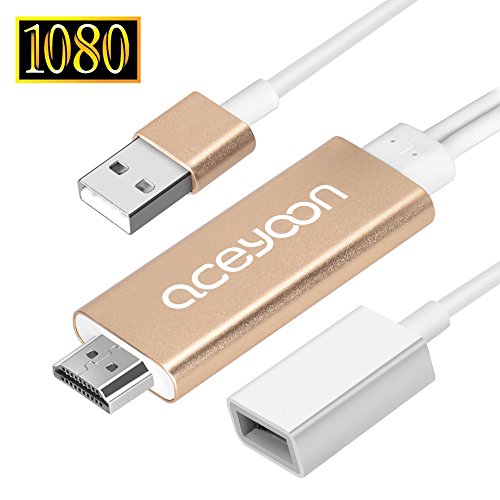
aceyoon Lightning to HDMI Digital AV Adapter 1080P USB Lightning 2 in 1 Screen Mirroring Airplay Connector Cord for iOS Android Devices
Product Description
aceyoon Lightning to HDMI Digital AV Adapter 1080P USB Lightning 2 in 1 Screen Mirroring Airplay Connector Cord for iOS Android Devices
- **Must be powered by 5V 1A current to ensure it's normal working. Used to convert the contents in your lightning or android devices to HD TV, monitor or projector synchronously to achieve the display that audio and video on the same screen.
- Plug and play for Lightning devices , no need to install software or driver, and personal hotspots is not required. Android devices need to download APP "EZcast", easy connection.
- Maximum resolution is 1080P, not compatible with the TV or monitor which resolution is 720P or below. Please confirm clearly before place order.
- Adopts high quality imported chip and oxygen-free copper core, enhance the transmission speed, reduce signal attenuation, ensure stable and superspeed transmission. Aluminum alloy shell, stylish and durable , good heat dispassion performance.
- Wide applications, compatible with iOS8-iOS10 and Android 4.4 above version devices, such as iPhone 5 / 5C / 5S / iPhone 6 / 6S / 6 plus / 6S plus / 7 / 7 plus, iPad mini, iPad Air, Samsung Galaxy Note3, Samsung S4(I9500), Samsung S6(SM-G9200), S7, Lenovo K30-T, OPPO R9 etc..
Parameter:
Brand: aceyoon
Product name: Lightning to HDMI cable
Max resolution: 1080P
Video format: avi, divx, mkv, ts, dat, vob, mpg, mpeg, mov, mp4, rm, rmvb, wmv
Image format: jpeg, bmp
Audio format: mp1/mp2/mp3, wma, ogg, adpcm-wav, pcm-wav, aac
Voice Record: mp3, wav
File-formats: adobe pdf, ms word, ms excel, ms PowerPoint, I works
Compatible devices:
iOS devices: IPHONE5/5C/5S/IPHONE6/6S/6PLUS/6SPLUS/7/7PLUS/iPad
Android devices: Samsung Galaxy Note3, Samsung S4(I9500), Samsung S6(SM-G9200), S7, Xiaomi 4 MI4L TE-CU, Lenovo K30-T, MIEZU MX Note2, MX4, HUAWEI MT7-CL00, MT7-TL10, honor H60-L02, P7-L09, PE-UL00, OPPO R9 Material: Aluminum alloy + PVC
Color: Gold
Cable length: HDMI cable 205cm, USB cable 85cm
Package details:
Lightning digital AV cable *1
User manual *1
Connection steps for iOS devices:
1. Connect HDMI cable adapter to your TV (Monitor or Projector), chose HDMI signal source
2. Connect the USB cable with an external (5V) adapter
3. Connect lightning port with your iOS device
4. Wait a few seconds, the screen of your iOS device shows on TV
Connection steps for android devices:
1. Connect HDMI cable adapter to your TV (Monitr or Projector) ), chose HDMI signal source
2. Connect the USB cable with an external (5V) adapter
3. Scan QR code in screen to down APP" EZcast"
4. Open EZcast, click the "W " in the upper right corner
5. Select "Option 2", and click "connect", then connect micro usb cable with your phone
6. select "share your internet using USB"
7. Wait a few seconds, your phone casts to TV
Technical Specifications
You might also like

Hawaiian Cake Topper Summer Flower Cake Toppers Flamingo Cake Toppers

Mizone Kids Monkey Business 3 Piece Comforter Set, Pink, Twin

Alera ALESW59SL3618 Shelf Liners for Wire Shelving, Clear Plastic, 36w x 18d (Pack of 4)

New Way 764 - Youth T-Shirt It's Everyday Bro Jake Paul Team 10 Medium Charcoal

pf121-b Chad's Guitar Lounge Beer Bar Pub Room Neon Light Sign
Marc by Marc Jacobs Quilted Printed Laptop Case Red O/S

Basil in the Wild West (The Great Mouse Detective)

Converse Unisex-Child Chuck Taylor All Star Low Top Sneaker, pink, 9 M US Toddler