
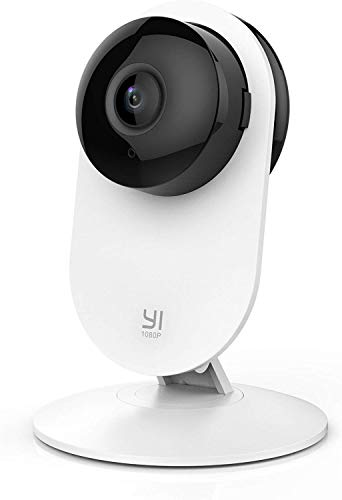
YI Security Home Camera for Indoor
Product Description
YI Security Home Camera for Indoor
- Optional 24/7 professional-grade, video alarm system - The smart camera-based security system utilizes vision AI and 24/7 professional monitoring services to detect potential intruders and distribute verified video in real time via an app that replaces the outdated panel system.
Setting Up Your Camera With YI Home App
1.Install YI Home App and create a YI Home Account
2.Power your camera on and click the icon on theupper right corner in YI HOME app to add your camera
3.Select your Wi-Fi network and enter your Wi-Fi password, then select Connect to Wi-Fi
4.Scan the QR Code shown on the app, then select Next once the QR Code has scanned
5.Select Save, then select Start using to finish pairing
6.If connection failed, please push the Reset button and try again
WiFi Settings
1.YI Home cameras will need to connect to a 2.4GHz band network. 5GHz WiFi band is not supported
2.Turning on the location service on the phone if you encounter Unknown SSID issue
3.Encryption mode must be set to WPA/WPA2 (mixed mode) or WPA2
4.Your Wi-Fi password must be 8-20 characters in length
If you have any other problem, please contact us via [email protected].
Technical Specifications
You might also like
2 Pack Yi Home Camera Wall Mount Stand Bracket for Yi Home Security Camera 360 Degree Swivel, Full Install kit with Wire Clips (2 Pack)
YI Outdoor Security Camera, 1080p Cloud Cam IP Waterproof Night Vision Surveillance System with 24/7 Emergency Response, Motion Detection, Activity Alert, Deterrent Alarm, Phone App, Works with Alexa

[6 Pack] Aotnex Wall Mount for Yi Home Cameras, Yi Home Wall Mount Stand Bracket for Yi Home Security Camera 360 Degree Swivel, Full Install kit with Wire Clips

4 Pack Home Camera Wall Mount Stand Bracket for Yi Home Security Camera 360 Degree Swivel, Full Install kit with Wire Clips (4 Pack)

(Pack of 2) Yi Home Camera Mi Home Security Camera Wall Mount, KASMOTION 360 Degree Swivel Camera Bracket Holder Customized for Mi/Yi Home Security Camera
YI Dome Camera, 1080p Indoor Pan/Tilt/Zoom Wi-Fi 2.4G IP Security Surveillance System with 24/7 Emergency Response, Auto-Cruise, Motion Track, App Remote Control, Cloud Service - Works with Alexa

(Pack of 4) Aboom Wall Mount Compatible with Yi Home Camera Customized Stand Bracket for YI 1080p/720p Home Camera Designed for USA (NOT INCLUDED CAMERA)

SanDisk Ultra 32GB MicroSDHC UHS-I Card with Adapter - 98MB/s U1 A1 - SDSQUAR-032G-GN6MA

YI Outdoor Security Camera 2pc, 1080P 2.4G Wi-Fi IP Waterproof Night Vision Surveillance System with 24/7 Emergency Response, Motion Detection, Activity Alert, Deterrent Alarm, Works with Alexa