
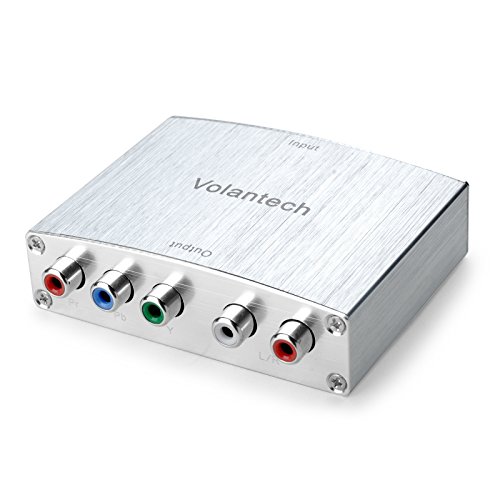
Volantech 4K HDMI to YPbPr Component 5RCA V1.4 RGB Converter and Support for Macbook/Nintendo Switch/PS4 Pro/Amazon Fire TV etc
Product Description
Volantech 4K HDMI to YPbPr Component 5RCA V1.4 RGB Converter and Support for Macbook/Nintendo Switch/PS4 Pro/Amazon Fire TV etc
- HDMI to YPbPr 4K 1080p scaler compatible with the Nintendo Switch/ Laptop /PS3 /PS4 /PS4 Pro /Apple TV /Roku /Amazon Fire TV /Blu-Ray DVD /HD Projectors /Xbox 360 /Xbox One /DVB receiver/Game Console etc. Supports uncompressed 2 channel audio such as LPCM.
- The HDMI port support MAX 4K 30Hz resolution resource input. It otters solutions for digital entertainment center, HDTV retail and show site, HDTV, STB, DW and Projector factory conference room noise space and security concerns, data center control, information distribution presentation, school and corporate training environment.
- 4K HDMI to YPbPr component Convert HDMI input into analog YPbPr video and R/L audio signal output Support OSD (On-Screen Display) for input and output resolutions. This is a component HDMI to RGB YPbPr Converter. If you use it wrong, you cann't get any signal.
- Support laptop which has HDMI interface resolution 4K/30Hz, 1080p/60Hz, 1080i/60Hz, 720p/60Hz, 576p/60Hz, 576i/60Hz, 480p/60Hz, 480i/60Hz; Support Ypbpr component output: 1080p/60Hz, 1080i/60Hz, 720p/60Hz, 720i/60Hz, 480p/60Hz; Support 165MHz/1.65Gbps per channel (6.75Gbps all channel) bandwidth for HDMI Input.
- Use friendly, Easy to Use Install in seconds, No need of setting, it can not be reverse to use. If you encounter product quality problems, Please first inform us that you will be compensated within 24 hours.
This converter box converts 4k HDMI to Component Video (Y-Pb-Pr) and stereo audio. Power on the HDMI to component converter (use the adapter included) then the red indicator LED light on. Power on TV and choose the signal input to component, then your will see the signal source on screen. The connect steps as below: Connect the HDMI source to the input of Converter. Connect HDTV to the output of converter via component cable. Plug one power supply into the converter.
Important notes:
1. Kindly check your input signal is correct. This product is a HDMI to Component Converter, not Component to HDMI Converter,
it can not be reverse to use.
2. Use component cable (Provided it yourself) connect Volantech converter to TV YPbPr interface (Red-Red, Blue-Blue, Green-Green).
3. Power on the Volantech HDMI to component converter (use the adapter included), connect all the devices and then see if the red indicator light is on.
4. Sometimes there is the statics electricity between the converter and the old tv, and the static make no signal, please knock the converter on the desk,
then the static can be removed.
5. Please be noted that the products can work with Amazon fire stick and Apple TV. Please turn off the power first then turn on the power in order to help
the item identify Amzon fire stick or Apple TV. When you use the Amazon fire stick, remember to plug the USB power cable (Provided it fire stick).
6. Use HDMI V1.4 or V2.0 cable (Provide it yourself) connect signal source to Volantech converter.
Warranty:
All products are backed by a 1 year warranty. Please contact us via email if you have any questions.
Technical Specifications
You might also like

Volantech Component YPbPr RGB to HDMI 4K Converter V1.4 Support PS3, DVD, Xbox 360 to HDTV, Monitor and Projector

Mediabridge Component Video Cables with Audio (6 Feet) - Gold Plated RCA to RCA - Supports 1080i

Monoprice 1.5ft 22AWG 5-RCA Component Video/Audio Coaxial Cable (RG-59/U) - Black
Cmple 5-RCA Male to 5RCA Male RGB Component Audio Video Cable for HDTV - Gold Plated RCA to RCA - 6 Feet, Black

Slingbox 500

Mediabridge Component Video Cables with Audio (12 Feet) - Gold Plated RCA to RCA - Supports 1080i

3 In 1 Out Component AV Video Switch Box Splitter RGB Selector Converter for Xbox 360 Wii PS2 PS3 DVD/VCD/EVD/HDVD

AmazonBasics RCA Component Video Cable with Audio - 6 Feet

BlueRigger RCA- 5 Cable (Component Video Cable with Audio, 6 Feet)

Portta Component to HDMI Converter, Portta YPbPr Component RGB + R/L Audio to HDMI Converter v1.3 Support 1080P 24bit 2 Channel Audio LPCM for HDTV PS3 PS4 HDVD Player Wii Xbox and More