

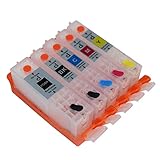
Topcolor Compatible Edible Ink Cartridges Replacement for PGI-250 CLI-251 Use for PIXMA MX922 MX722 MG5420 MG5520 MG5620 MG6620 IP7220 IX6820 Printer, 5 Pack (1 PGBK 1 Black 1 Cyan 1 Magenta 1 Yellow)
Product Description
Topcolor Compatible Edible Ink Cartridges Replacement for PGI-250 CLI-251 Use for PIXMA MX922 MX722 MG5420 MG5520 MG5620 MG6620 IP7220 IX6820 Printer, 5 Pack (1 PGBK 1 Black 1 Cyan 1 Magenta 1 Yellow)
- ♥ Tips: ①, Do not use a printer with Edible Ink which has been used with regular ink, It is harmful if mix together. ②, Just in case, The ink may leak for uncontrollable factors in the transportation, even we have carefully checked at the time of packaging. If you find it happens, Please attach a picture to us and ask for replacement. ③, Not recognized: Pls Take out cartridge, Clean the chip then reinstall the cartridge untill it is recognized.
- Compatible for: Edible printer PIXMA MX922 MX722 MG5420 MG5422 MG5520 MG5522 MG5620 MG6420 MG6620 IP7220 IX6820
- Package: 5er Remanufactured PGI-250 CLI-251 Ink Cartridge (NON-OEM)
- Feature: Easy to install and use, High-quality ink, print with excellent color. Edible safety. Perfect dessert decoration for cake, chocolate etc.
- Contatc us: Enter Sold by "Topcolor" > Click "Ask a question" > Sign in your Amazon Account. (Built to ISO9001 and ISO14001 factory standard, 100% refund or free replacement guarantee within 12 Months)
A beautiful moment, let us keep it together!
Details
Package:5er Remanufactured PGI-250 CLI-251 Ink Cartridge (NON-OEM)
Ink Volume: Black : 22ML, PBK/Cyan/Magenta/Yellow : 15ML.
Warranty period: 2 years, avoid storing in high temperature, and direct sunlight.
Compatible model: Edible printer PIXMA MX922 MX722 MG5420 MG5422 MG5520 MG5522 MG5620 MG6420 MG6620 IP7220 IX6820
Friendly Tips:
â‘ , Print Blank: Please be sure the Orange clip is in "Covered" the ink outlet state, Shake the Cartridges or clean the print head.
â‘¡, When printer record the same memory serial number, usually there are two Error message: "Replace cartridge" and "Ink cartridges cannot be recognized" : Take out cartridge, Clean the chip then reinstall the cartridge untill it is recognized
If other error messages appear, like "Low Ink" "Cartridge Problem" "Missing or damaged", try the same solution, or restart the printer.
â‘¢, Do not update the firmware of your PIXMA series printers, not matter it is Automatic or Manual. Otherwise All the compatible inks (NON-OEM) will not work for the memory serial number of chip.
â‘£, Because of the printer's model, ink and software, there will be differences in printing density and color, please follow the printer's instructions to adjust the color.
⑤, Due to uncontrollable factors in the transportation, if you find the cartridge is leaking or other issues, please contact us.
Two ways to contact us:
â–º Directly enter 'Topcolor" store > Find and click 'About Seller' > Contact this seller > Sign in your Amazon account.
â–º Directly enter Sold by 'Topcolor" store > Click 'Ask a question' > Sign in your Amazon account.
Technical Specifications
You might also like

paper2eat Frosting Sheets Premium (Icing Sheets) 8.5" x 11" - 24 count

Supreme Icing Sheets 12 Pack Premium White 8.5" x 11" by MeganJDesigns

Sotek 250XL 251XL 250 251 XL Bakey Ink Cartridges 5 Color for Cake Printer,Cake Maker, Work with Pixma PIXMA MX922 MG5520 MX920 MG5420 (5Pack)

Pastry Ideale Gold Dust

Wafer Paper 100 count White 8.5" x 11" by MeganJDesigns
CEYE for Canon IX6820 MX722 MX922 MG5522 MG5620 MG6420 MG6620 IP7220 MG5420 MG5422 MG5520 Empty Refillable Ink Cartridge PGI-250 CLI-251 5pcs

Oasis Supply O-Grade Wafer Paper, 8 by 11-Inch, 25 Count

CANON PIXMA iX6820 Wireless Business Printer with AirPrint and Cloud Compatible, Black

Supreme Icing Sheets 24 Pack Premium White 8.5" x 11" by MeganJDesigns
Wilton 399-5004 14-Piece Support Rods and Caps, Purple