
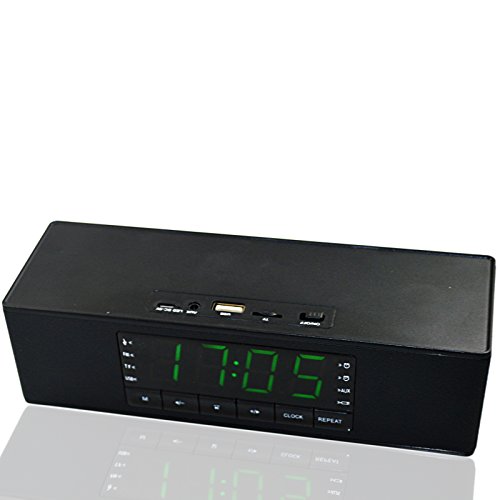
Teastar Wireless Bluetooth Speaker Portable with Mic Handsfree Calling Support LED Display Alam Clock MicroSD TF Card U Disk MP3 Playback for Mobile Phone PC Tablet Laptop ect (Black)
Product Description
Teastar Wireless Bluetooth Speaker Portable with Mic Handsfree Calling Support LED Display Alam Clock MicroSD TF Card U Disk MP3 Playback for Mobile Phone PC Tablet Laptop ect (Black)
- Bluetooth speaker with two 5W speakers,and is equipped with powerful bass diaphragm
- Bluetooth 3.0 version,compatible with Apple,Samsung, Android etc smartphone and table pc with bluetooth and other devices Bluetooth wireless transmission of audio.
- Built-in MiC, support handsfree phone calling, can plug TF card and U disk MP3 player to play music
- This bluetooth speaker with large digital screen display, and support clock and alarm settings function
- Bluetooth wireless transmission,suitable for all people loving music,and easy to carry.
Features:
Bluetooth Version: 3.0
Bluetooth profiles: A2DP,AVRCP, HFP, HSP
Bluetooth Range: 10M
Speaker: 5W*2
Battery capacity: 1200mAh
Cable: 3.5mm jack audio cable
Dimension: 199 * 55* 68mm
Support Bluetooth/Line in Audio connection, TF card, Hards-free calling
Time and Alarm Setting:
1> Long press COLOCK to set time
1. Long press CLOCK to set time,now it's hour setting with flash,the flash time is 5S, press previous or next button to change the hour.
2. After the hour is done, short press clock to go to minute setting.press previous or next button to change the minute.
3.when minute is done, short press clock to go to weekday setting.press previous or next button to change the weekday, it shows d1, d2, d3, d4, d5, d6, d7.
4. When weekday is done, short press clock to confirm the setting
2>Long press M to set alarm
1. Long press M to set alarm 1, then press previous or next button to change the hour.
2. When hour is done, short press M to go to minute setting, press previous or next button to change the minute.
3. When minute is done, short press M to go to alarm weekday setting,( if need alarm every day, choose 1-7, if only workdays, then 1-5...) press previous or next button to change the weekday
4. Short press M go to the ring setting(if you donnt want to use the alarm after setting, choose OFF mode, it won't ring) press previous or next button to change the ring volume. then short press M to confirm the setting.
5. It will ring when time and alarm time is same, and press any button will stop the ring.
Package Included
Bluetooth Speaker
Technical Specifications
You might also like
all Unit Dose Laundry Detergent, Mighty Pacs, Free Clear, OXI, 72 Count

all Liquid Laundry Detergent Free Clear, 118 Ounce, 94 Loads

all Liquid Laundry Detergent, Sensitive Fresh, 82.5 fl oz, 110 Loads

all free clear Fabric Softener Dryer Sheets for Sensitive Skin, 195 Count

all free clear Laundry Detergent MIGHTY Pacs, Odor Relief, 56 Count, 2-Pack

all Liquid Laundry Detergent, Odor Relief, Unscented, 80.1 fl oz, 90 Loads

all Liquid Laundry Detergent for Sensitive Skin 237 Fluid Ounces

Samsung Premium 11.6-Inch HD Chromebook Intel Dual Core Celeron Up to 2.48GHz, 4GB DDR3 RAM, 32GB eMMC Memory, 802.11ac WiFi, Bluetooth, HDMI, Stereo Speakers, Webcam, USB 3.0, Google Chrome OS