
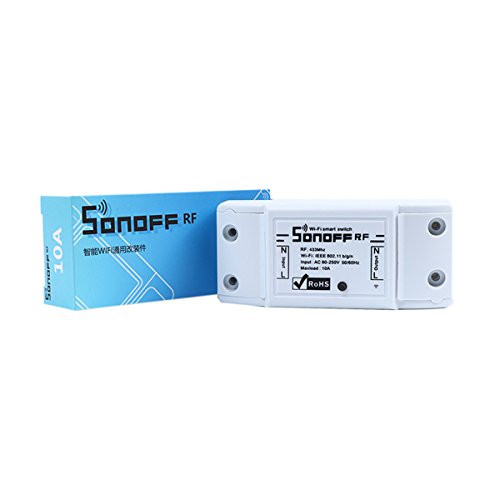
Sonoff Smart Homekit Smart Switch Universal Module Timer Wifi Switch Supports RF-WiFi 433Mhz Wireless Remote Control Capability Via IOS Android
Product Description
Sonoff Smart Homekit Smart Switch Universal Module Timer Wifi Switch Supports RF-WiFi 433Mhz Wireless Remote Control Capability Via IOS Android
- √ Home automation is "The Internet of Things". The way that all of our devices and appliances will be networked together to provide us with a seamless control over all aspects of our home and more.
- √ Sonoff is a low-cost, affordable device that help you to step into the amazing smart home.It is a WiFi wireless switch that can connect to appliance of different types and brands.
- √ Sonoff sends data to cloud platform through the WiFi Router, which enables you to remotely control all appliances with the App eWeLink on your smart phone. The server of Sonoff is Amazon AWS global server.
- √ Sonoff makes all your home appliances smart, as long as your phone has network you can remotely turn on or turn off your appliances from anywhere at any time. And by setting timing schedules for your appliances, you can maintain a carefree life.
- √ The App eWeLink enables you to control your devices easily. You can download the iOS version in App Store and the Android version in Google Play.
Sonoff Wifi Switch Universal Smart Home Automation Module Timer Diy Wireless Switch Remote Controller Via IOS Android 10A/2200W
Features
Support WiFi network.
Support 433MHz RF remote.
Support status tracking, home appliances status timely feedback to your App.
Support remotely turn on or off added devices.
Support Max 8 timing tasks for each added device.
Support numerous WiFi smart switches one smart phone.
Easy installation, easy handling and can be activated immediately and stably
Guidance:
How to install this device, please do as follow
Switch off electricity source
Open the two covers at both ends
Connect the two electricity source cables(Live and Neutral) to the 2 ports with "IN" mark, one cable for one port, and there's no limitation for which port to connect
Connect the two appliance cables(Live and Neutral) to the 2 ports with "OUT" mark, one cable for one port, and there's no limitation for which port to connect
Make the Cover Install Firmly
Technical Specifications
You might also like

FLKQC 15 Pack Restaurant Menu Covers Holders 8.5" X 11", Single View Synthetic Leather Menu Holder Covers Book Style with Angled Corners Black for Wine List, Menu Sleeves Home Use (15, 1 Page)

Restaurant Menu Covers 8.5 x 11 – Black Faux Leather Menu Holder with Gold Corners, 2 Pages 4 Views, Waterproof Menu Covers for Restaurants, Cafes & Bars

Restaurant Menu Covers 8.5x11 – 12 Pack Clear Vinyl Menu Holders with Silver Corners, 2 Page 4 View Letter Size Menu Sleeves for Restaurant, Cafe, Bar, Bistro & Hotel

AMGSH 12 Pack 4 View Menu Holder Menu Covers 4.25" x 11" | Black Leather Menu Sleeves Book Style for Restaurant Coffee Bars Wine List

FLKQC Menu Covers 4.25 x 11", 10Pcs 4 View Leather Restaurant Menu Holders

Nicunom 12 Pcak Restaurant Menu Covers, 8.5 X 11 Inch Menu Covers, 2 Page 4 View Transparent Menu Holders for Bar Cafe Restaurant, Double Stitched Edge
2PCS 8.5 x 11" Menu Covers,4 Page 8 View Restaurant Menu Holders
25 Menu Covers 8.5 x 11 Inch Menu Holder Double Stitched Menu Covers Single Page Menu Cover Two Clear Viewing Surfaces Restaurant Menu Covers