
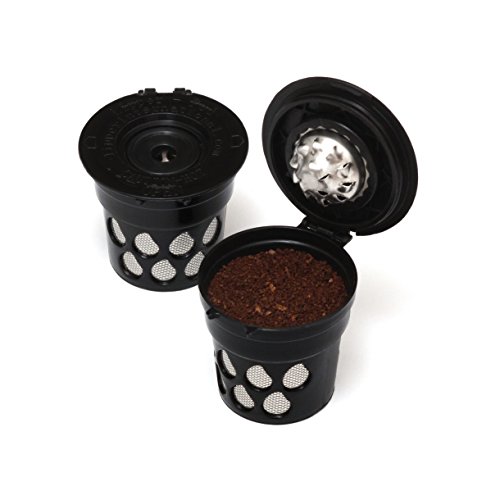
Reusable Coffee K-Cup Filters (Set of 2) - Use your Own Coffee in all Keurig 2.0 and Earlier Brewers
Product Description
Reusable Coffee K-Cup Filters (Set of 2) - Use your Own Coffee in all Keurig 2.0 and Earlier Brewers
- The Lipperpod Works with All 2.0 and traditional Keurig K-Cup Brewers
- Save Money and Re-use Over and Over Again.
- Be Able To Choose Whichever Coffee You Want!
- No Stickers Required making Washing Easy
- 100% BPA Free and Dishwasher Safe.
Reusable K-Cup Coffee Filter -Refillable Single Serve Pod for Keurig Brewers. Instructions for use in the K2.0-300 series (K300 & K350) and K2.0-400 series (K400 & K450): Step 1. Fill the Lipperpod with NO MORE than 2 tablespoons (1 scoop) of coffee. Press the coffee into the Lipperpod to ensure the Lipperpod closes and remains closed without being held. Step 2. Place a mug on the Drip Tray. Lift the Handle and place the Lipperpod in the Pack Holder with the Hinge of the Lipperpod facing the left side of the Pack Holder and the "OPEN" label of the Lipperpod facing the right side of the pack holder. The arrows should be pointing up and down. Step 3. Lower the Handle and press CONTINUE to dispense hot water. Step 4. Select your Brew Size (4 oz. or 6 oz.) and press the Brew Button. When the brew process is complete, the Touch screen will indicate Enjoy! Instructions for use in the K2.0-500 series (K500 & K550): Step 1. Fill the Lipperpod with NO MORE than 2 tablespoons (1 scoop) of coffee. Press the coffee into the Lipperpod to ensure the Lipperpod closes and remains closed without being held. Step 2. Press the Hot Water Button and place a mug on the Drip Tray. Step 3. Lift the Handle and place the Lipperpod in the Pack Holder with the Hinge of the Lipperpod facing the left side of the Pack Holder and the "OPEN" label of the Lipperpod facing the right side of the pack holder. The arrows should be pointing up and down. Step 4. Lower the Handle. Step 5. Press and HOLD the Brew Button to dispense up to 6 ounces of hot water (water will stop dispensing as soon as the Brew Button is released). The brewer will stop dispensing after 6 ounces. Step 6. When the brew process is complete, the Touch screen will indicate Enjoy!
Technical Specifications
You might also like

Eco-Carafe for Keurig 2.0, K200, K300, K400, K500 Series

K-cup 2.0 Freedom Stickers for Keurig 2.0 Series Brewers

Everyday 6-Pack Replacement Charcoal Water Filters for Keurig Coffee Machines
Perfect Pod C09091 EZ Carafe for Keurig 2.0, K200, K300, K400 and K500 Series, Orange

Keurig K350 2.0 Brewing System