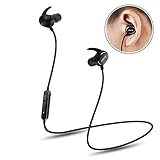
QCY True Wireless Bluetooth Headphones with Dual Earbuds for Truly Stereo Earphones with Mic(Black)
Product Description
QCY True Wireless Bluetooth Headphones with Dual Earbuds for Truly Stereo Earphones with Mic(Black)
- TRUE WIRELESS Enjoy the free music without wire limitation No more worrying about cable bouncing tapping or rubbing while moving head
- DUAL MODE The separated two earbuds could be used together for stereo mode or used separately like a hands free earpiece for driving For stereo mode please follow the pairing instructions in Description
- COMFORT AND SECURE FIT The ergonomic design could keep the earbuds in the ear canals comfortably without falling And the three size ear tips included could suit for most people s ear No Pains will be caused for long time wearing KIND NOTICE QCY Q29 Bluetooth headphones suit for indoor relaxing NOT RECOMMERND FOR SPORT
- Bluetooth depends on both hardware and software to work properly So if your devices cant speak a common Bluetooth language they wont be able to connect Some devices have smart power management that may turn off Bluetooth if the battery level is too low. If your phone isnt pairing make sure it and the device you re trying to pair with have enough juice A soft reset sometimes can resolve an issue With phones an easy way to do this is by going into and out of airplane mode
- WARRANTY AND CAUTIOUS We provide the One Year warranty from the date of purchase for manufacturer defects If the device fails due to a manufacturing defect please contact seller directly to initiate return and warranty process CAUTIOUS this TWSTrue Wireless earbuds need a new pairing method which may be a little bit complex If you are not quite comfortable for learning the different tech please think twice before purchasing
For easier way of using,please read the following instructions:
One Ear Mode: Use either of the two earpieces separately. It's just the traditional connecting way. Choose one earpiece, press and hold the button until it says "Power On. Pairing". Enter the Bluetooth settings on the smartphone and search for either "QCY-Q29_L" or "QCY-Q29_R" to get paired until you hear "Pairing successful. Connected".
Dual Ear Mode/Stereo Mode:
1. Put the right earpiece into right ear. Press and hold the button on it until it says "Power On. Pairing". Pair it from the smartphone with the name of "QCY-Q29_R" until it says "Pairing successful. Connected."
2. Put the left earpiece into the left ear. Press and hold the button on it and release until it says "Power On." Wait around 5 seconds. You'll hear the left earpiece says "Connected". Right earpiece says "Second device connected". Then "Left Channel" from left and "Right Channel" from right. Then you got the pair successfully. Enjoy the True Wireless Earbuds for fun.
Want to try the ADVANCED way?
1. Switch on and Pair the right earpiece with smartphone.
2. Press and hold the button on right earpiece to switch it off.
3. Put both right and left earpieces into both ear canals. Simultaneously press and hold the buttons on both the earpieces and do not release before you hear "Connected. Left Channel. Right Channel." This process may take around 8 seconds or so. Later you'll hear "Second device connected." from the right earpiece, which means the pairing between earpieces and smartphone is done.
Specifications:
Brand: QCY
Model Number: Q29
Bluetooth Version: Bluetooth 4.1
Operation Distance: Up to 10 meters
Weight(Each): 5.3g
Charge Port: Micro USB
Package Includes:
Q29 Earphone
Mirco USB Charging Cable
3 Ear Tips
English User Manual
Charge case