
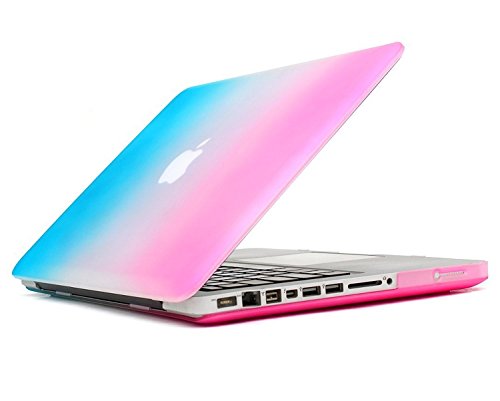
Mosiso MacBook Pro 13 Case, Ultra Slim Soft-Touch Plastic See Through Hard Shell Snap On Cover for MacBook Pro 13.3" (A1278 with or without Thunderbolt) Aluminum Unibody with CD-ROM Drive, Rainbow
Product Description
Mosiso MacBook Pro 13 Case, Ultra Slim Soft-Touch Plastic See Through Hard Shell Snap On Cover for MacBook Pro 13.3" (A1278 with or without Thunderbolt) Aluminum Unibody with CD-ROM Drive, Rainbow
- The case Only fits for Macbook Pro 13" with CD-ROM (A1278), No Cut Out design, transparency is different from color to color
- WARNING: This case can't Fit Macbook Pro 13" with Retina Display(A1502/A1425), Macbook Air 13" (A1369/A1466), Macbook White 13"(A1342), Macbook Air 11"(A1370/A1465)
- Please kindly check the model number "A1xxx" on the back of the laptop before your purchase
- Fully vented for safe heat disbursement,Fully access to all buttons and features. Snap on design, easy on easy off. Plug your charger, cable or headset without removing the case
- Mosiso 1 year warranty on case and Mosiso lifetime warranty on rubber feet
Mosiso® High Quality Soft-Touch Plastic Hard Case Series
Specifications
— Designed to fit MacBook Pro 13.3" Aluminum Unibody A1278
— Snap on design, easy on easy off
— Fully access to all buttons and features
— Plug your charger, cable or headset without removing the case
— Super light-weight with smooth rubberized exterior texture to protect your MacBook from scrapes and scratches
— Material: Polycarbonate
Case Compatible with
MacBook Pro 13.3" with or without Thunderbolt
Model: A1278
MB466LL/A, MB467LL/A, MB990LL/A, MB991LL/A, MC374LL/A, MC375LL/A,
MC700LL/A, MC724LL/A, MD313LL/A, MD314LL/A, MD101LL/A, MD102LL/A
Case NOT Compatible with
— Macbook Air 11" (A1465 / A1370)
— Macbook Air 13" (A1466 / A1369)
— Macbook Pro 13" with Retina Display (A1502 / A1425)
— Macbook 12" with Retina Display (A1534)
— Macbook Pro 15" with Retina Display (A1398)
— Macbook Pro 15/15.4" (A1286)
Installation
1. Start with the top cover of the case. Clip the 2 clips at the back of the MacBook first.
2. Pull the case slightly to the front until the 3 clips "clicking".
3. Turn around the MacBook. Clip the bottom cover on the back of the MacBook first.
4. Pull the case slightly to the front until the clips "clicking".
Technical Specifications
You might also like

HDE Rainbow Pride Color Silicone Rubber Keyboard Skin Cover for Macbook Pro (Metallic Rainbow)
HDE Silicone Rubber Keyboard Skin for MacBook Pro (Non-Retina) (Blue/Pink Gradient)

Mosiso MacBook Air 13 Case, Ultra Slim Soft-Touch Plastic See Through Hard Shell Snap On Cover for MacBook Air 13.3" (A1466 & A1369), Rainbow

DHZ® Keyboard Cover Silicone Skin for MacBook Pro 13" 15" 17" (with or w/out Retina Display) iMac Apple Wireless Keyboard and MacBook Air 13" (Hot Pink Gradient)

TopCase Polar Light Series Silicone Keyboard Cover Skin for Macbook

Mosiso - Ultra Thin Clear TPU Keyboard Cover Skin for MacBook Air 13" and MacBook Pro 13" 15" 17" (with or w/out Retina Display) iMac -Clear