
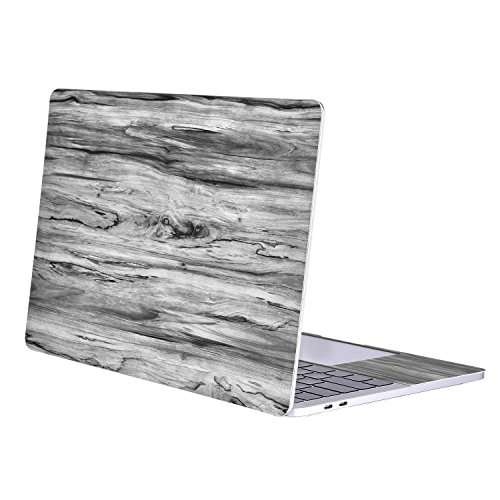
Mosiso MacBook Pro 15 Sticker 2017 & 2016 Release A1707, Removable Protective Full-cover PU Leather Decal Cover Skin for Newest Macbook Pro 15 Inch with Touch Bar and Touch ID, Black Wood Grain
Product Description
Mosiso MacBook Pro 15 Sticker 2017 & 2016 Release A1707, Removable Protective Full-cover PU Leather Decal Cover Skin for Newest Macbook Pro 15 Inch with Touch Bar and Touch ID, Black Wood Grain
- The decal sticker cover skin Only fits 2017 & 2016 Release Newest MacBook Pro 15 Inch with Touch Bar and Touch ID (A1707 with Touch Bar Release June 2017 -- MPTR2LL/A, MPTU2LL/A, MPTT2LL/A, MPTV2LL/A and Release October 2016 -- MLH32LL/A, MLW72LL/A, MLH42LL/A, MLW82LL/A), NO Cut Out design.
- WARNING: This decal sticker cover skin can't Fit [Previous Generation] Macbook Pro 15 Inch with Retina Display (model: A1398), Old Macbook Pro 15 Inch with CD-Drive (model: A1286).
- Please kindly check the model number "A1xxx" on the back of the MacBook before your purchase.
- Comes with 1 full body MacBook skin and 1 wrist skin. Super light-weight and ultra-thin decal sticker cover skin effectively protect your MacBook from any scrapes and scratches.
- Dust proof, waterproof and oil proof. Easy on and easy off that won¡¯t leave behind any residue. Mosiso 1 year warranty on decal sticker cover skin.
Mosiso High Quality Removable Protective Full-cover PU Leather Decal Sticker Cover Skin for 2017 & 2016 Release Newest MacBook Pro 15 Inch
Specifications
Designed to fit The Newest MacBook Pro 15 Inch (A1707 with Touch Bar, Release 2017 & 2016)
Super light-weight decal sticker cover to protect your MacBook from scrapes and scratches
Material: PU Leather
Compatible with
Newest MacBook Pro 15 Inch with Touch Bar
Model: A1707
Newest Release 2017 & 2016
Release June 2017 -- MPTR2LL/A, MPTU2LL/A, MPTT2LL/A, MPTV2LL/A
Release October 2016 -- MLH32LL/A, MLW72LL/A, MLH42LL/A, MLW82LL/A
NOT Compatible with
Macbook Pro 15 Inch with Retina Display (A1398)
Old Macbook Pro 15 Inch with CD-Drive (A1286)
Apply
Clear the surface of your MacBook first, then peel off the decal, put it gently on the surface in the right position. Finally use a card to scrape flat it, please make sure there is no bubble. During the processing, please do not press the decal.
Remove
If you want to remove your decal or replace the old one, the removal mothod is also very easy. Please peel the decals one by one slowly and carefully, you can heat it with hair drier to make the adhesive to dissolve a little, then it will be easy to remove them.
Technical Specifications
You might also like

Illustrated Index of British Shells

Truckers Guide to Health and Longevity

Voyages Métallurgiques: Ou, Recherches Et Observations Sur Les Mines ... En Allemagne, Suéde, Norwege, Angleterre & Ecosse ... Avec Figures; Volume 2 (French Edition)

Inside Congressional Committees: Function and Dysfunction in the Legislative Process

Binvin 3D Printed Animals-Snake Viper,3D Printed Snake Toys 3D Printed Articulated Snake 3D Printed Animals Animal Model Ornaments Creative Funny Toy Festival Gift for Frends (Luminous Blue, 29 Inch)

Metal Floor Fan Large Industrial Fan, Volume Speed, Adjustable, Mail Type, Powerful Agricultural Blowing Fan, Cooling Fan for alle

Right Passenger Side Automatic Transmission Output Shaft Seal for Camry

Little Tikes TotSports T-Ball Set, Red Red/Blue, 11inx12inx22"