
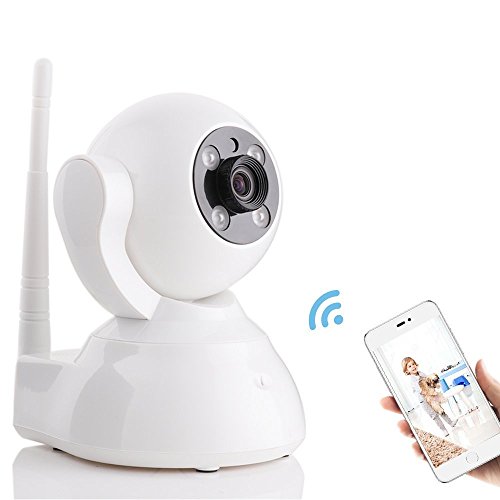
Home Camera, 720P P2P WiFi Security IP Camera with Two-Way Audio Pan and Tilt for Baby, Elder, Nanny, Pet Monitor with Night Vision by JHS-TECH
Product Description
Home Camera, 720P P2P WiFi Security IP Camera with Two-Way Audio Pan and Tilt for Baby, Elder, Nanny, Pet Monitor with Night Vision by JHS-TECH
- ◆EASY INSTALLATION: no complicated port mapping or DDNS settings, 1 min setting WIFI and watching HD picture
- ◆TWO-WAY AUDIO: built in microphone and speaker, super perfect listening
- ◆15M NIGHT VISION: Low illumination 0.3 LUX, 4 pcs Infrared dot matrix lamp
- ◆YOOSEE APP: allow you to connect via iOS/Android smart-phone in 1 step by camera voice instruction
- ◆REMOTE PAN/TILT CONTROL: 355° horizontally and 120° vertically, support 32GB TF Card memory
This product is widely used in the family, shops, warehouses, operating room, office and other places. The product is exquisite, simple installation, convenient, can remote monitoring and intercom, let love whenever and wherever possible!
Main Features:
WIFI IP Camera,Surveillance Camera,Nanny Camera,Video Monitoring,Recording,live streaming,P2P,Plug,Play,Pan,Tilt with Two Way Audio,Night Vision,Motion detection with automatically Alarm Message sent to Mobile App
Specification:
Main chipset: GM8135 Maximum resolution: 720P
Compression standard :H.264 Imag sensor: 1/4" 1.0MP OV9712 CMOS
Video mode: Manual recording,alarm recording, time recording
Low illumination: 0.3 LUX Image
Frame Rate: 25FPS,1.0MP:1280*720
Wireless function: Built-in wireless WIFI module,support for 802.11b /g/n
Audio input: Built in 45dB microphone
Audio output: Built in 8?, 1.5 Wspeakers
Storage:TF memory card storage, maximum capacity :32G
Night vision:Using IR CUT dual filter,automatic switching day and night,10 ?5mm LED lights,4 pcs Infrared dot matrix lamp,IR distance of 15 meters
Mobile monitoring:IOS/Android Power: 3W Power supply: DC 5V/2A
Operation Manual:
1.Download app "Yoosee" to your iPhone or Android mobilephone
2.Access to mobile app "Yoosee",and choose to "add camera"
3.Choose "Intelligent connect",then click next,and you need to input Wifi name and wifi password,then click next,and camera will be connected successfully after seconds,camera has voice prompt during this whole operation
Technical Specifications
You might also like

Sogrand 8pcs-Pack,Solar Lights Outdoor,Solar Light,Landscape Lighting,Solar Pathway Lights,for Lawn,Patio,Yard,Walkway,Driveway,Pathway,Garden,Landscape

DOSS Cloud Book Wireless Portable Bluetooth 4.0 & Wi-Fi Straming Music speaker,support Pandora,Spotify,iHeart,Tuneln,Multi-room play,Built-in rechargeable battery,handsfree,12 hours play[Color:Black]