
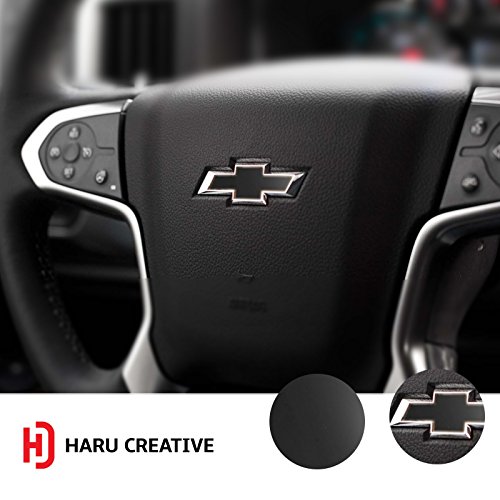
Haru Creative - Chevrolet Traverse 2009-2012 Steering Wheel Bowtie Overlay Insert Sticker Decal - Gloss Black
Product Description
Haru Creative - Chevrolet Traverse 2009-2012 Steering Wheel Bowtie Overlay Insert Sticker Decal - Gloss Black
- TYPE - Haru Creative Premium HC Series Adhesive Film - Gloss Series
- PREMIUM QUALITY - Unlike ordinary stick and peel stickers, our decals are made of real HC vinyl and have been designed with Air Release Technology for the perfect application making installation much more simple and easier for any DIY skill level. High quality vinyl adhesive, weather resistant, 3mil UV protection
- PERFECT FIT - Precision cut for your Chevrolet steering wheel bowtie emblem - Change the feel and appearance of your vehicle, without the high costs
- EASY APPLICATION and SAFE REMOVAL - Once you are ready for a new decal or want to remove from your surface, our high quality vinyl backing will not leave any unwanted residue or stains
- AUTHENTICITY - Haru Creative products are exclusively sold by Haru Creative. Make sure you receive your authentic Haru decal sticker to ensure quality and authenticity. If you ever have any issues, please contact our team that is ready to help, 100% satisfaction guaranteed
Haru Creative offers a wide assortment of premium quality cast vinyl adhesive film. With our large selection of vibrant colors and texture patterns, you can express your creativity exactly how you want.
Product Specifications:
- Premium Cast Vinyl
-Fits years 2009, 2010, 2011, 2012
- Heat gun or hair dryer recommended (not included)
- UV Protective Coating + Weather Resistant Surface
- Vinyl has natural "memory" - it can be wrinkled and then returned to near original condition with gentle heat applied
Basic Installation Guide:
1) Wipe down and clean your Chevrolet steering wheel emblem. Make sure the area is clean, free from dirt or other debris
2) Peel off the adhesive decal from the backing
3) Carefully apply the decal letter over the emblem, making sure to lay it flat eliminating the air bubbles
4) If needed, use a felt edge tool or squeegee to assist with application
5) If needed, use a heat gun to slightly warm up the decal, press firmly and apply heat to assist with adhesion.
*Let us show you that we care about all our customers, 100% satisfaction guaranteed! *Please contact us if you run into any issues and our customer support team would be more than glad to assist you!
Technical Specifications
You might also like

Shade&Beyond 37.5" W x 56" H No Drill Cordless Cellular Shades, White
Shade&Beyond 43" W x 56" H No Drill Cordless Cellular Shades, Green
Shade&Beyond 29" W x 24" H No Drill Cordless Cellular Shades, White

Shade&Beyond 47.5" W x 56" H No Drill Cordless Cellular Shades, Yellow

Shade&Beyond 46" W x 36" H No Drill Cordless Cellular Shades, Brown
Shade&Beyond 22.5" W x 72" H No Drill Cordless Cellular Shades, Yellow

Shade&Beyond 40" W x 72" H No Drill Cordless Cellular Shades, Beige
Shade&Beyond 40.5" W x 48" H No Drill Cordless Cellular Shades, Green