
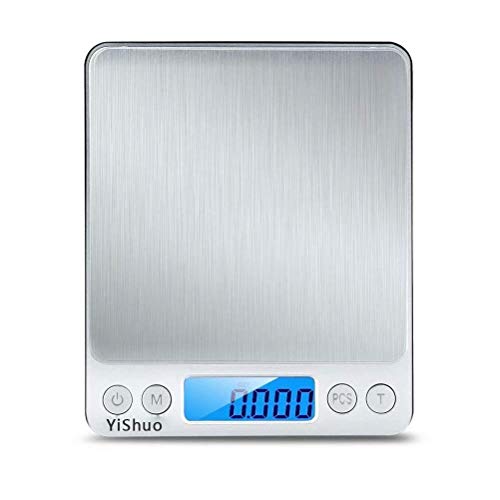
AiPoter Digital Pocket Kitchen Scale 0.01oz/0.1g 3000g Kitchen Food Scale Weight Compact Scale, Tare, Stainless Steel, Backlit Display
Product Description
AiPoter Digital Pocket Kitchen Scale 0.01oz/0.1g 3000g Kitchen Food Scale Weight Compact Scale, Tare, Stainless Steel, Backlit Display
- Stainless Steel Materials - The digital kitchen food scale is crafted to be strong, accurate, fast, and user-friendly. With a weight range of up to 3000g/105.82oz, and increments of 0.1g/o.005oz,Constructed with a high-quality stainless steel platform, durable and easy to clean.
- Fast and Easy - this digital scale allows for easy calibration, whether to switch units from grams to ounces or pounds to kilos. Alongside this use its piece counting button to calculate quantities without the hassle, including its Taring function which ensures maximum accuracy in the Kitchen.
- Multi-function - The counting feature gives you an accurate count especially for food. Precision Tare Button calculates the net weight of your ingredients.
- Widely Use - The two transparent plastic cases are perfect to weigh items such as fruits/liquids/food seasoning.
- Quality Guarantee - 90 days no-questions-asked return policy for a 100% refund If you are not Satisfied with your Purchase for Any Reason, Please Feel Free To Contact Us
Note: Weight less than 20g may decrease the accuracy of the scale.
Specifications:
Weight Capacity:3000g
Divsion: 0.1g (0.01 oz)
Measurement Units: g/ct/dwt/ozt/oz/gn
Function Buttons: Power / Mode / PCS / Tare
Platform: 3.94*3.94 inches
Power: 2*AAA batteries(included)
Tare Weighing:
1. Turn on the scale.
2. Place a tray or container on the scale platform.
3. Press T button and "0.00" will displayed.
4. Add items to the container or tray.
Count Pieces:
Note: All items must be of uniform weight for the counting feature to work.
1. Turn on the scale.
2. Press and hold the PCS button until you see PCS flash on the top left corner of the lcd display, and a sample count(25) displayed.
3. Press the M button until the display shows the sample count you want(available sample counts are 25/50/60/75/100), then place the sample count on the platform same as the lcd shows, and press PCS button to confirm.
4. Press PCS button again for counting, you may now place any number of the items on the scale, lcd will display a count.
Package Contents:
1 x Digital Scale
1 x Scale Cover
1 x Platform Cover
1 x User Manual
2 x AAA Batteries
Technical Specifications
You might also like

American Weigh Scales Signature Series Silver AWS-1KG-SIL Digital Pocket Scale, 1000 by 0.1 G

Introduction to General, Organic and Biochemistry

American Weigh Scales Calibration Weight Kit WGHTKIT, Class M2

GDEALER Instant Read Thermometer Super Fast Digital Electronic Food Thermometer Cooking Thermometer Barbecue Meat Thermometer with Collapsible Internal Probe for Grill Cooking Meat Kitchen Candy
AMIR Digital Kitchen Scale, 500g/0.01g Mini Pocket Jewelry Scale, Cooking Food Scale with Back-Lit LCD Display, 2 Trays, 6 Units, Auto Off, Tare, PCS Function, Stainless Steel, Batteries Included

Flower Fuel 1-34-32, 250g - The Best Bloom Booster For Bigger, Heavier Harvests (250g)

WillPowder Soy Lecithin Powder, 1 lb