
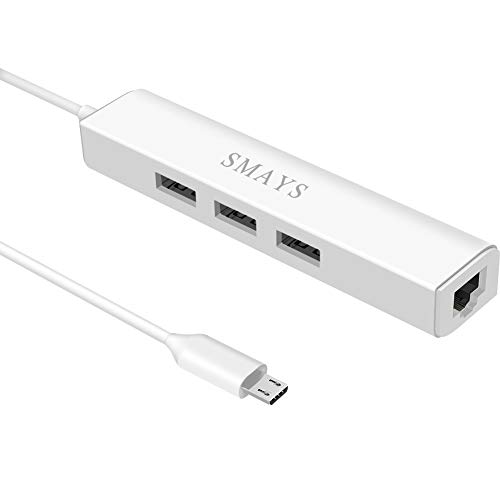
Micro USB Hub with Ethernet Adapter, OTG Cable for Fire tv Stick /4K /Cube
Product Description
Micro USB Hub with Ethernet Adapter, OTG Cable for Fire tv Stick /4K /Cube
- Network adapter compatible with Fire Stick Lite 2020, Firestick 3rd gen/4K Max 2021, Fire TV Stick with Alexa Voice Remote (2nd Gen -- 2016 release), all-new Amazon Fire TV (2017 release), Fire TV Cube
- 3-port otg USB Hub - Allows streaming stick to access and store apps and files on an external USB flash drive; works with mouse, keyboard, SSD, and memory card reader to transfer data
- Supports 10/100M Internet speed, Stable wired internet, no buffering, no lag
- 5V DC-in power cord - Connect with your own power adapter or a 5V/2A wall charger to the Fire TV Stick and 3 female USB port
- Easy to set up - 1. Connect the Ethernet/HUB adapter with the stick; 2. Plug network cable into Ethernet/HUB adapter; 3. Connect our USB-DC cable with your wall charger
- Compatible with Amazon Echo Show 5, Echo Show 2nd Generation, Echo Show 8
- Compatible with Shark Roku TV; Chromecast Ultra/2nd gen/1st gen/Audio, Home Mini
- Compatible with onn android tv stick
RJ45 to Micro USB Ethernet adapter
Compatible with Amazon Fire TV Device, TV Cube, Google TV Box to your modem, router or switch allowing a fast Ethernet network speed
Uses of this adapter:
1. Work well with window tablets (not used with RT but full windows version).
2. Work with Android devices provided - (a) The device has OTG port (ie USB host facility) and (b) The manufacturer has installed the Ethernet drivers. If the device only has OTG port but no Ethernet drivers then it will not connect.
(A) Tablets that support Ethernet connection:
1. Asus Zenpad S 8 inch tablet.
2. Lenovo A10 (latest 10 inch tablet).
3. Samsung Tab 4 (8-inch version, 10-inch version and 12-inch version but 7inch version does not support it).
4. Samsung Tab 8.4
5. Samsung Tab A series.
6. Samsung Tab S series.
7. Nexus 7-inch 1st generation on Android 4.4
8. Nexus 9 inch tablet
(B) Phones that support this adapter:
1. Motorola G 1st generation, 2nd generation and 3rd generation.
2. Motorola X 1st generation, 2nd generation and 3rd generation.
3. Motorola E 2nd generation (but not the first generation).
4. Samsung Galaxy Nexus
5. Nexus 5 (Nexus 4 does not support Ethernet connection)
6. Nexus 6.
7. Nexus 5X and 6P.
8. Asus Padfone X
9. Asus Padfone X mini (only the phone, the tablet portion does not as the micro USB socket is not OTG).
10 Asus Padfone 4.3
11. Sony Z3 , Z5.
12. Asus Zenfone Go.
How to setup?
1, Disconnect with your WiFi
2, Connect your device micro USB port to this Ethernet adapter's micro USB
3, Plug your internet cable into this Ethernet adapter's RJ45 port
4, Plugged DC cable into DC hole (Refer to the 2nd picture)
5, Enjoy with your time
Package include:
1 X Ethernet adapter
1 X DC cable
Technical Specifications
You might also like
[2 PACK] TV xStream USB Port Adapter, Micro OTG Cable and Power - Compatible with Streaming Sticks, Media Devices, Rii and Logitech Keyboards, and Nintendo Switch, SNES, NES Classic

AuviPal 2-in-1 Micro USB to USB Adapter (OTG Cable + Power Cable) - 2 Pack

AuviPal 2-in-1 Powered Micro USB OTG Adapter 90 Degree Right Angled with Micro USB Power Charging Port for Streaming TV Stick, S/NES Classic Mini, Sega Genesis, Android Phone or Tablet - 2 Pack
AuviPal LAN Ethernet Adapter with 3 Ports USB OTG Hub for Streaming TV Stick, Chromecast, Google Home Mini, Raspberry Pi Zero - Powered Micro USB OTG Cable Included

UGREEN USB 3.0 Hub Ethernet Adapter 10/100/1000 Gigabit Network Converter with USB 3.0 Hub 3 Ports for Nintendo Switch, Windows Surface Pro, MacBook Air/Retina, iMac Pro, Chromebook, PC
iPazzPort Backlit Keyboard and Bluetooth Mini Wireless Keyboard with Touchpad for Raspberry Pi and Android Smart Tv and PC KP-810-21SBL

DSYJ Micro USB Host OTG Cable with Micro USB Power for Galaxy Nexus Nexus 4 Nexus 7 Galaxy SIII

UGREEN Ethernet Adapter for Fire TV Stick (2nd GEN), All-New Fire TV (2017), Chromecast Ultra / 2/1 / Audio, Google Home Mini, Micro USB to RJ45 Ethernet Adapter with USB Power Supply Cable (3.3ft)
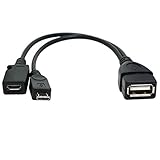
TV xStream USB Port Adapter, Micro OTG Cable and Power - Compatible with fireSticks, Streaming Media Devices, Rii and Logitech Keyboards, and Nintendo Switch, SNES, NES Classic (1 Pack)

USB Wall Charger FOBSUNLAND. USB Wall Plug 5V 2A AC Power Adapter Compatible with iPhone,iPad,Samsung,Huawei,Tablet,Kindle and More (White 2pack) (White 2pack)