
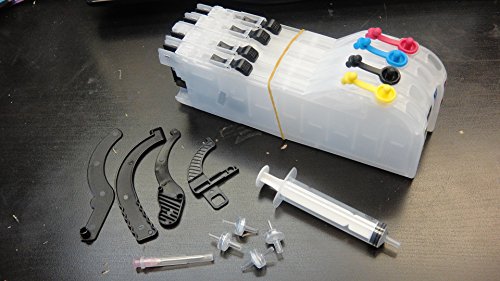
EkutenTM for brother LC101 LC103 LC105 LC107 Printer empty CISS MFC-J245 MFC-J4710DW MFC-J285DW MFC-J475DW MFC-J4310DW MFC-J650DW MFC-J4410DW MFC-J6520DW MFC-J450DW MFC-J6720DW MFC-J4510DW MFC-J6920DW MFC-J4610DW MFC-J870DW MFC-J470DW MFC-J875DW
Product Description
EkutenTM for brother LC101 LC103 LC105 LC107 Printer empty CISS MFC-J245 MFC-J4710DW MFC-J285DW MFC-J475DW MFC-J4310DW MFC-J650DW MFC-J4410DW MFC-J6520DW MFC-J450DW MFC-J6720DW MFC-J4510DW MFC-J6920DW MFC-J4610DW MFC-J870DW MFC-J470DW MFC-J875DW
- container size : black 100ml, colors 80ml
- buyer must needs their original ink cartridge before depleted sign appears
- Brother genuine chip will turn into unlimited mode while CISS using
- Door censor, 4 air filters, instruction included, video instruction also available on our website
- **** There are no Auto reset chips, i tested all copied chips but it had all problem after few month, had best result from the genuine chips, no problem until now for 8 month so far ****.
Many sellers are selling with auto reset chips, Eventually , there are no auto reset chips on this LC 101 CISS in the market, you must reset the CISS to reset the ink level. also it is counterfeit to use auto reset chips, and when printer updates firmware, printer will kill the chips. We've been search this genuine chip to converting unlimited chip for 8 month and now have all test result. We are goint ot explain to you step by step for how to use genuine ink cartridge chips for CISS on our video instruction. Very easy & Simple.
Technical Specifications
You might also like

INKUTEN 4 Bottles Refill Ink (100ml Black, 100ml per color, total 400ml) For Brother LC101 LC103 LC105 LC107

Brother MFCJ450DW Wireless with Scanner, Copier and Fax Inkjet Printer

Brother Compatible Lc103 Lc105 Lc107 Refillable Ink Cartridge
20 oz. (600 ML) Jumbo Printer Ink Cartridge Refill Kit Color & Black

Brother LC71 LC75 LC79 Ink cartridges - Empty refillable CISS for Brother Printers:MFC-J280W, MFC-J425W, MFC-J430W, MFC-J625DW, MFC-J825DW, MFC-J835DW, MFC-J5910DW, MFC-J6510DW, MFC-J6710DW, MFC-J6910DW

InkOwl - Chip Resetter for BROTHER LC103, LC105, LC107