
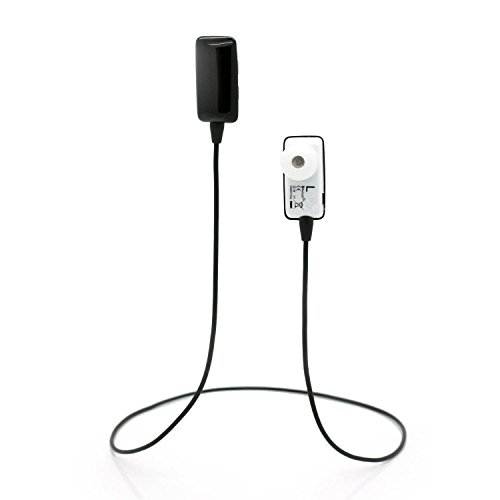
Ecandy Mini Wireless Stereo Bluetooth Headset Headphone Handsfree Earphone Earpiece Earbud w/Microphone Mic, A2DP, Noise Cancellation, Music Remote Control, for iPhone 6/6+/5/5s/5c, iPhone 4/4s, iPad 1/2/3, new iPad, iPod and Samsung Galaxy S2, S3, S4, Galaxy note 1/2/3, I9100, I9300, I9500, I9700,Most Android Smartphones and all Enabled Bluetooth devices-black
Product Description
Ecandy Mini Wireless Stereo Bluetooth Headset Headphone Handsfree Earphone Earpiece Earbud w/Microphone Mic, A2DP, Noise Cancellation, Music Remote Control, for iPhone 6/6+/5/5s/5c, iPhone 4/4s, iPad 1/2/3, new iPad, iPod and Samsung Galaxy S2, S3, S4, Galaxy note 1/2/3, I9100, I9300, I9500, I9700,Most Android Smartphones and all Enabled Bluetooth devices-black
- Awesome wireless earbuds with microphone can be stay in your ears comfortablely
- EXCELLENT sound and clear voices with Chewing Sweet Design
- Pairing is pretty intuitive and will pair with iphone, Samsung Galaxy, Ipad, Smart phones perfectly
- Play/pause (also answer calls), Vol +/-, and next/previous track buttons, super easy operation, good workmanship,BQB Certificated
- Easy to wear, exceptionally light design stays on during Sports & Exercise & outdoor activity
Specifications:
Support Profile : Headset/HandsFree/A2DP/AVRCP
Range: 10M
Talking Time: 3-4 hours (Depending on the volume)
Music Time: 2-5 hours (Depending on the volume)
Standby Time: 120 hours
battery: Lithium
Color:black
Importance Notice:
1. Before you start using the headset, please use the USB charge cable to charge it first.
2. Pairing, press the power button of the headset for 10 seconds or longer until you see the blue-red light blinking alternately or hear a beep.
3. Make sure you turned on the bluetooth on your phone, search headset model on it. The headset support the laptop which with built-in bluetooth adapter or inserted in a third party bluetooth adapter。
4. Select the Bluetooth model and click connect. Enter the password or code 0000 if needed.
5. when the connection is successful, the headset will beeep and appears in your phone menu.
Technical Specifications
You might also like

IBRO Powerlifting Lever Gym Belt – 10MM, 13MM or 8MM Power Weightlifting
Double-Layer windscreen Sun Shade Compatible with Renault Megane CC Cabrio 2010-2015,Double-Layer Anti-Glare, Foldable, with Storage Bag

Human Hand Skeleton Model on Base, Hand Bone,Life Size, Articulated

Collagen Pills -90 Capsules With Hyaluronic Acid, For Anti -Aging, Hair Growth & Nails, Acne, Healthy Joints & Skin| For Youthful Skin, Supports Elasticity, Reduce Wrinkles | Hydrolyzed Multi Collagen

Haribo Goldbears Mini Bags Bulk Pack of 25 Individually Wrapped

Haribo Gold Bears 2oz (2 Pack) Total 48 Packs

Mobil - 100870 Rarus 427, Compressor, 1 qt, ISO100 (Pack of 6)

o0:.:0o