
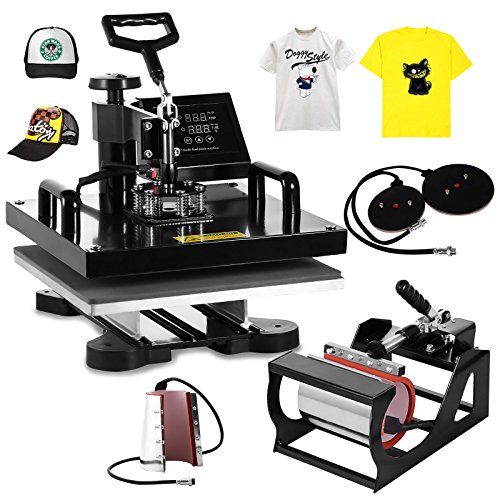
BestEquip Heat Press Machine 6 in 1 Digital Transfer Sublimation T Shirt Heat Press 15x15 Inch Heat Press for T-shirt Hat Mug Plate Cap (15'' x 15'' 6IN1)
Product Description
BestEquip Heat Press Machine 6 in 1 Digital Transfer Sublimation T Shirt Heat Press 15x15 Inch Heat Press for T-shirt Hat Mug Plate Cap (15'' x 15'' 6IN1)
- Platen Press:15" x 15" (38X38cm). Hat/Cap Press: 6"x 3" (curved).Mug Press:3"-3.5"diameter (11OZ)
- Heat press machine equipped with digital LED temperature and time controller
- This heat press is full 360-degree rotation of swing-away design
- Package include:1 X Fully-assembled machine with platen press;1 X Hat press;2 X Mug presses;2 X Plate presses;1 X Removable silicone pad and cotton pad;1 X Operating Manual
- This heat press machine can be used for T-shirts, caps, ceramic plates, ceramic tiles, mugs, coasters, mouse pads, jigsaw puzzles, lettering, other misc. fabrics & materials
6 In 1 Heat Press Machine 15" X 15" (38 X 38cm) Digital Transfer Sublimation for T-shirt Mug Hat
This 6 in 1 heat press machine can be used for T-shirts, caps, ceramic plates, ceramic tiles, mugs, coasters, mouse pads, jigsaw puzzles, lettering, other misc. fabrics & materials. It can transfer colorful pictures and characters of sublimating and dissolved printing ink onto ceramics, glasses and textiles such as cotton, flax, chemical fiber, nylon, etc. This all-in-one press includes flat platen, mugs and plates. The swing-away heat press boasts all of the must-have attachments.
Item Specifications
Temperature range: 0 - 480ºF (0 - 250ºC)
Timer control: 0 - 999 seconds
Wattage: 1000W
Power input: 110V
Dimension: 23.4"L x 20.2"W x 17.5"H
Platen Press : 15" x 15" (38X38cm)
Hat/Cap Press: 6"x 3" (curved)
Mug Press #1: 3"-3.5" diameter (11OZ)
Mug Press #2: 12OZ latte mug (Cone)
Plate Press #1: 5" max diameter
Plate Press #2: 6" max diameter
Temperature setting:
Press "SET", the upper display will showing "SP", and the lower of display will showing the temperature of last setting. Then enter into temperature setting option, press â–¼ or â–² (increase or decrease) to set the needed temperature. After setting well, please press "SET", the upper display will show "SK" to go on the next step for time setting
Time setting:
Press "SET" again, H1 LDE will showing "ST", then enter into the time setting. Press â–¼ or â–² (increase or decrease) to setting the needed time. (Normally the time is 180 seconds for mugs and 15-20 seconds for t shirt printing)
Technical Specifications
You might also like

3 Pack Teflon Sheet For 16x20 Heat Press Transfer Sheet SUPER SALE LIMITED TIME

CNHIDEE Massager Wand Magic Body Cellulite Foot Face Neck Back Head Massage Mini Cordless Vibrating Handheld Portable Waterproof Multi Speed 10X Rechargeable Silicone Therapeutic Muscle Sport Recovery

SISER EasyWeed Heat Transfer Vinyl, 12 x 15" 12-Color Starter BUNDLE

Saltwater Spinning Reel, Cheetah Saltwater Fishing Reels for Heavy-duty Jigging Boat Fishing or Inshore Surf Casting, Piers or Reefs, Kayak Freshwater Fishing - with Corrosion Resistant Fishing Gear
WOYYLBP Battery Power Bank 10,400mAh Charger Pack 1 Port Input & 2 Usb Output ( 2.1A and 1A) Charging Stand for Apple Phone iPad Samsung Galaxy Smartphones Tablet. (Rose Gloden)

Pedometer, 3D Pedometer with Backlight Monitor and Neck Lanyard, Portable Sport Pedometer Digital Step Counter Fitness Activity Tracker Calorie Counter for Walking jogging Running by Bereezy

Supricolor 950XL 951XL Ink Cartridges High Yield - With Updated Chips - Works with HP OfficeJet Pro 8600 8610 8620 8630 8660 8640 8615 8625 276DW 251DW 271DW printers 1 Set (BK/C/M/Y)

1000-Use 3-Pack Teflon PTFE Sheet for Heat Press Transfers, 16 x 20” Heat Resistant Craft Sheet, 100% Non Stick Protects Iron and Work Area Even With Messy Glue, Ink or Paint!

Foldable Cloth Storage Cube On'h Fabric Drawer Storage Baskets and Bins for Home Kitchen Bedroom Office Pack of 6, Pink

Sotek TN660 TN630 Toners DR630 High Yield (2Toners +1Drum Unit), Work With DCP-L2520DW DCP-L2540DW MFC-L2700DW MFC-L2720DW MFC-L2740DW HL-L2300D HL-L2320D HL-L2360DW HL-L2380DW HL-L2340DW