
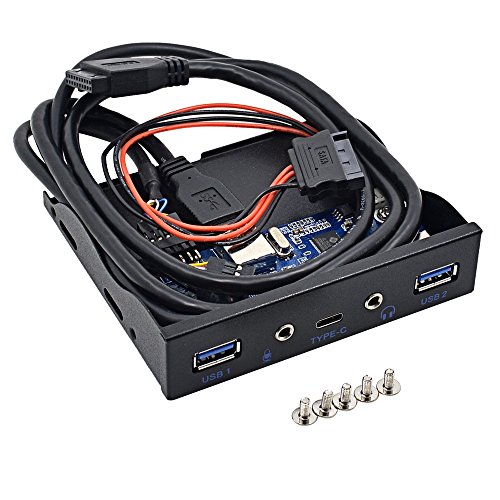
Azeroth USB 3.0 3.5 Inch Floppy Bay Desktop Font Penal Expansion USB Hub With all Cables required (2 USB 3.0/HD-Audio/USB C)
Product Description
Azeroth USB 3.0 3.5 Inch Floppy Bay Desktop Font Penal Expansion USB Hub With all Cables required (2 USB 3.0/HD-Audio/USB C)
- ▷ Multi-functional USB 3.0 3.5 inch floppy bay desktop font penal expansion USB Hub with all cables required (2 USB 3.0/HD-Audio/USB C).
- ▷ Super speed data transmit speed up to 5Gb/s and the latest Type-C devices connection.
- ▷ Easy to install and plug to play any USB devices, makes your desktop capable with more extension ports usage.
- ▷ Quality product ensuring durability for long term usage, compatible with Windows XP/Vista/7/8/8.1/10 and server.
- ▷ Package including one 4 ports front USB 3.0/HD-Audio/Type-C Panel with 15Pin SATA Power Cable, 20pin Motherboad Cable and a 5-screw pack.
Azeroth USB 3.0 3.5 Inch Floppy Bay Desktop Font Penal Expansion USB Hub With all Cables required (2 USB 3.0/HD-Audio/USB C)
Features:Â
1. 1.4-Port desktop front panel expansion 3.5'' floppy bay allows 4 ports with 2 USB3.0 / HD-Audio / Type-C universal devices connection
2. Super speed data transmit speed up to 5Gb/s and the latest Type-C devices connection.
3. Easy to install and plug to play any USB devices, makes your desktop capable with more USB ports / HD-Audio Port / Type-C Port.
4. Quality product ensuring durability for long term usage, compatible with Windows XP/Vista/7/8/8.1/10 and server
Package Contents: 1 of 4-ports 3.5'' inch floppy bay + 1 of 5 optional screw pack.
Before You Buy: Please check your desktop tower front panel size. Use a tape or ruler to measure the horizontal size of floppy bay. Typically, there are only two sizes, 3.5 inch and 5.2 inchCD-ROM is 5.2 inchSmaller than CD-ROM is 3.5 inch Please measure the size before you buy to ensure you choose the right size to fit your desktop.
Installation Instruction:
1. Take off front panel cover from desktop, and gently slide expansion panel into the bay. Many desktop tower has build-in clip to hold expansion panel steady. You may use screws to ensure solid connection.
2. Connect 15Pin SATA power cable to the SATA power cable from PSU (Power Supply Unit). The 15Pin SATA Power connector can be found along with your Hard Drive or SSD. Typically, it is a long L shape connector.
3. Connect 20pin Motherboad USB3.0 Cable to your Motherboard 20Pin USB 3.0 Port. You can also use 20pin connector on PCI Express Card(Not recommended since sometimes it may causes errors) .
Technical Specifications
You might also like

Jazz Styles and Jazz Classics CD Set (3 CDs) and MyLab Music with Pearson eText Valuepack Access Card Package (11th Edition)

Micro Kickboard - Mini Original 3-Wheeled, Lean-to-Steer, Swiss-Designed Micro Scooter for Preschool Kids, Ages 2-5, Purple

YING LAN Women's Platform Lace-Up Wingtips Square Toe Oxfords Shoe White
YING LAN Women's Platform Lace-Up Wingtips Square Toe Oxfords Shoe White
YING LAN Women's Platform Lace-Up Wingtips Square Toe Oxfords Shoe White

Supreme Housewares Crackle Melamine Serving Tray, BPA-Free Rustic Rectangular Platter for Appetizers, Cheese, Fruit or Entertaining, 20 x 13.5 Inch, Cream

YING LAN Women's Platform Lace-Up Wingtips Square Toe Oxfords Shoe Apricot

WLWNWFT 16x12in Large Slate Cheese Board for Meat, Cheese, Appetizers - Slate Platter with 2 Chalks - Perfect for Housewarming, Christmas, Mother's Day