

Watches,Kids Outdoors Waterproof Wristwatch,Multifunctional LED Digital Watch for Boys
Product Description
Watches,Kids Outdoors Waterproof Wristwatch,Multifunctional LED Digital Watch for Boys
- PRECISE TIME KEEPING: Japanese Movement, provide precise and accurate time keeping. Japanese battery which can provide the watch strong power.
- SHOCK RESISTANT: The excellent ABS Plastic case and Stainless Steel case back which enable the watch to be tough and durable.
- HIGHLY TRANSPARENT RESIN GLASS: The glass is made from the highly clear resin material imported abroad and sealed with the case by high frequency machine. So that the glass is extremely hard and pressure-tolerant.
- WATERPROOF FOR DAILY USE:30M Water Resistant, HANDWASH, Feel free to wear the watch when you are showering. NOTE: Please DO NOT press any buttons in the water or wear this watch for longtime underwater activities - such as diving, ect. Too much water contact or usage in extreme Hot or Cold temperature will shorter watch life.Not recommended for swimming.
- GREAT SERVICE:If you have any questions you can contact us,we will try our best to you help you.
Operation guide :
LIGHT( A ),MODE( B ),RESET( C ),START(D)
ï¶Alarm Settings
In normal mode, press B twice, The 'Hour' starts to flash, press D to set the hour for alarm.
Press C once, the 'Minute' starts to flash, press D to set the minute for alarm
Press B to exit the setting screen.
NOTES :The alarm sounds for about 60 seconds, to stop the alarm tone after it starts to sound, press D.
When setting the alarm time using the 12hour format, take care to set the time correctly as a.m.or p.m
ï¶Turn on/off the alarm
In normal mode, press C and D together, when the light around alarm flash, it means the alarm turns on; Press C and D together again, the light disappears, the alarm turns off.
ï¶Set the time/Date/Week
In normal mode, press B three times, then:
press C once, the "minute" flash, press D to set the minute;
Press C once again, the "Hour" flash, press D to set the hour ( press D several time to toggle the 12/24-Hour Format );
Press C once again, the "Day"flash, Press D to set the day;
Press C once again, the "Month" flash, press D to set the month;
Press C once again, the "Week"flash, Press D to set the week;
Press B to exit the setting screen.
you can also watch an operation video on Youtube :https://www.youtube.com/watch?v=5Du_uKEVcjw
Technical Specifications
You might also like

ALPS Kids Watches LED Digital Boys Girls Waterproof Watches (Blue)
Misskt 30m Water-proof Boys Girls Sport Digital Led Watch with Alarm Stopwatch Children Watch green

OUANGANC Water-proof Digital-analog Boys Girls Sport Digital Watch Alarm Stopwatch Chronograph (Orange)
BesWLZ Kids Sports Watches Multi Function Waterproof Quartz Watch Wrist Dress Watch With LED Digital Alarm Stopwatch for Boy - Blue
Hiwatch TM Waterproof 30M Outdoor with Alarm WOODLAND CAMO Digital Wrist Watches

Hiwatch Kids Watches Boys Girls Waterproof Sports Digital Wrist Watch for Youth

OUANGANC Water-proof Digital-analog Boys Girls Sport Digital Watch with Alarm Stopwatch Chronograph Blue
Kids Sport Outdoor Digital Watch for Boys Girls Waterproof Analog Quartz Dual Time Zone Watches with Chronograph Alarm Calendar Date Window Children Wristwatch - Blue
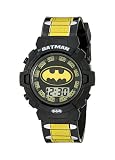
DC Comics Batman Kids' BAT4177 Digital Display Quartz Multi-Color Watch