
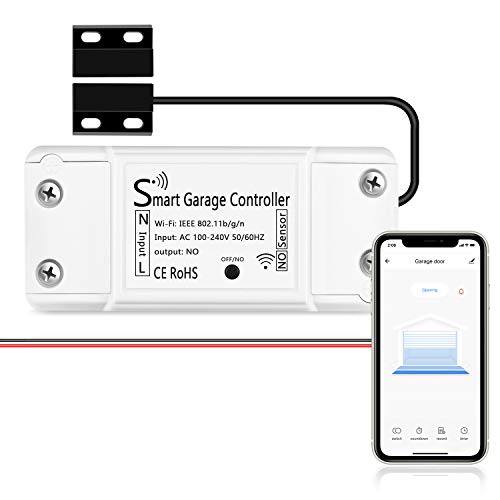
AGSHOME Smart Wi-Fi Garage Door Opener Remote, APP Control, Compatible with Alexa, Google Assistant, No Hub Needed with Smartphone Control
Product Description
AGSHOME Smart Wi-Fi Garage Door Opener Remote, APP Control, Compatible with Alexa, Google Assistant, No Hub Needed with Smartphone Control
- SMART GARAGE CONTROL Open and close your garage door from anywhere with your smartphone through the Alexa,Google home .Make your existing garage door smart. Remote and Voice Control, just tapping the smartlife app from anywhere or speaking to your Alexa, Google Assistant or SmartThings devices. To let in your family, guests or couriers through the garage door while you are cooking or not at home
- Compatibility : our smart garage door controller can compatible most of the brand garage openers. Scroll down and check your model compatibility in the "Technical Specification - Application Guide"
- Guest Smartphone control: Control, secure and monitor your garage door from anywhere and receive real-time notifications when your garage door is opening or closing.
- Only work with 2. 4 GHz WIFI CONNECTION ,5G is not supported! offers quick and easy installation without the need for a professional.
- BEST IN CLASS SECURITY SIMPLE SETUP Wireless installation with easy step by step instructions and video provided it's means you’ll be able to enjoy smart garage control in minutes
Compatibility Tips Before order,our smart garage door controller can compatible most of the brand garage openers. please check the incompatibility list in image 7. If your model can not compatible , you can use a test wire (or Pliers) to short connect the terminals where your garage door wall buttons are currently connected.
If your door opens or closes either, then it is most likely that this smart controller will work with your garage door opener.
Two way to get to connection mode:
(GENERAL SETTING)
1. Press the Black button for about 5 seconds. "10 SECONDS RESET" Make sure your device light is flashing quickly.
2. Launch the "Smart Life" or "Tuay Smart" APP. Press the icon '+' on the top right corner.
3. Select the "All Devices", then select the "Wi-Fi Connector" type.
4. Tap "Confirm indicator rapidly blink."
5. Input the correct 2.4G Wi-Fi passwords. Then, tap confirm.
6. It will auto-connect with the device. wait until the connection is successful.
(AP MODE)
1. Press the Black button for about 5 seconds. Make sure your device light is flashing slowly.
2. Press the icon '+' on the top right corner. Select "others". Then, select the "Wi-Fi Connector" type.
3. Go to the upper right corner. Then, press "AP MODE".
4. Press"Confirm indicator slowly blink". Then select your home's 2.4GHz networks, and enter Wi-Fi password.
5. Then the screen will show "connect your mobile phone to the device's hotspot". Press "Go To Connect" and it will connect. The screen will jump to your phone's settings wifi connection, so enter the phone's "WI-FI".
6. You will see the There will be a connection option: "Smartlife-XXX". Select it. In the tab that your WIFI is already connected to, it will state, "Smartlife-XXX" on it. Now return to "Smartlife The APP" screen.
Addtional tips: when you use Google Home,you need to set up the code from smart life app by click bell icon.
Technical Specifications
You might also like

3-way Smart Light Switch,Neutral Wire Required,Treatlife WiFi Light Switch Single Pole/3-way Switch Works With Alexa, Google Assistant, Remote Control, ETL, Schedule, No Hub Required, 4 PACK

Smart Light Switch, Treatlife 2.4Ghz Smart Switch Wi-Fi Light Switch, Neutral Wire Required, Works with Alexa and Google Assistant, Single-Pole, Schedule, Remote Control, ETL Listed, 4 PACK

Single Pole Treatlife Smart Light Switch(Neutral Wire Required), 2.4Ghz Wi-Fi Light Switch, Works with Alexa and Google Assistant, Schedule, Remote Control, Single Pole, ETL Listed (4 PACK)

Single Pole Treatlife Smart Light Switch(Neutral Wire Required) , 2.4Ghz Wi-Fi Light Switch, Works with Alexa and Google Assistant, Schedule, Remote Control, Single Pole, ETL Listed (2 PACK)

Smart Light Bulb Compatible with Alexa Google Home, NiteBird A19 E26 Wifi Dimmable Warm White 2700K LED Lights Bulbs, 75W Equivalent, No Hub Required, 4 Pack

MOES WiFi Smart Garage Door Opener Controller Smart Life/Tuya APP Wireless Remote Control from Anywhere Compatible with Alexa Google Assistant and IFTTT No hub Required

Smart Light Switch, 2 Way WiFi Smart Switch Button, Compatible with Alexa and Google Home, Remote Control with Timing Funtion, No Hub Required,Smart Life APP Provides Control from Anywhere

Gosund Smart Switch, Smart Light Switch Works with Alexa, Google home and IFTTT, with Remote Control and Schedule, Needs Neutral Wire, Single-Pole, No Hub required, ETL and FCC listed (2 Pack)

3 Way WiFi Smart Wall Light Switch Wireless Remote APP Control From Anywhere Compatible with Alexa and Google Home Timer Function No Hub Require(3-Way Smart Switch (1 Piece))

meross Smart WiFi Light Switch, Wall Switch, Compatible with Amazon Alexa, Google Assistant and IFTTT, Remote Control, Schedules, Timer, No Hub Needed - Upgrade Version