
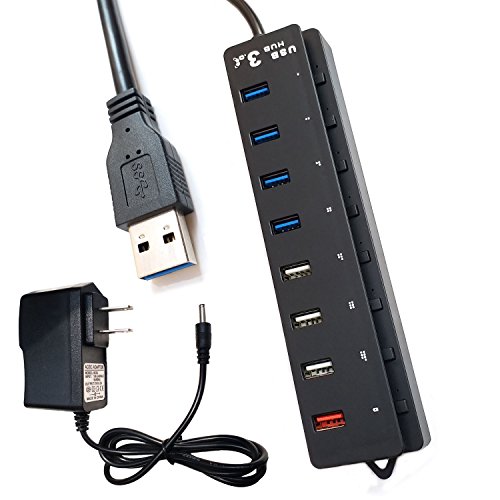
8 Port USB Hub, 4 Ports SuperSpeed USB 3.0 Data Hub + 3 High Speed USB 2.0 Data Ports + 1 Smart Charging Port ( 5V/Max.2A ) and Comes With a 5V-2A Adapter
Product Description
8 Port USB Hub, 4 Ports SuperSpeed USB 3.0 Data Hub + 3 High Speed USB 2.0 Data Ports + 1 Smart Charging Port ( 5V/Max.2A ) and Comes With a 5V-2A Adapter
- 8 USB PORT: 4 USB 3.0 SuperSpeed ports (5Gbps) to your PC for faster sync times + 3 high speed USB 2.0 data ports full-speed 480 Mbps and low-speed 12 Mbps USB device profiles + 1 Smart Charging Port (5V/Max.2.4A). Just can spend more time on your work and less time syncing.
- Supports plug-n-play, hot swapping. Compatible with any USB 3.0, USB 2.0, USB 1.1 and USB 1.0
- No installation of drivers required for Windows XP / Vista / 7 / 8 / 10, Linus, Mac OS X 10.2 and above.
- 8 Separated Switches: Each port correspond an electric switch, it's Energy saving design.
- comes with a 5V-2A adapter, used for using multiple mobile hard disk or quick charge
Features:
4 USB 3.0 Superspeed ports+3 USB 2.0 High speed ports+1 Smart Charging Port
Built - in intelligent charging ( 5V 1A/2 A ). Offine smart chip charging.
8 HUB each port with a separate switch, saving power and environmental protection
8 HUB each interface with power indicator, the use of more convenient;
With 23 in long USB3.0 data cable, easy to carry and easy to use;
comes with a 5V-2A adapter,used for using multiple mobile hard disk or quick charge
Specifications:
Dimendions: 7.5 x 1.75 x 0.9 in
The product itself Built-in USB cable (23 in )
USB 3.0 supports high speed 5Gbps transmission, and backwards compatible USB 2.0 / USB 1.1
Support Windows XP / 2000 / 2003 /Vista / 7 /8 and Mac os ( 10. x and above ),Linux.
Packaging Contents:1 x 8 Ports USB 3.0 Hub
1 x 5V-2A Adapter
Additional Notes:
Some USB 3.0 devices require direct connection to host ports. 2.4Ghz wireless devices (keyboards, mice, etc.) may not work around USB 3.0 ports. Try using a USB 2.0 connection instead.
If you find the computer not recognizing the device after it has been plugged in, try unplugging the UBS port and re-plugging it back into the computer.
Technical Specifications
You might also like

She Whispered I Am The Storm Motivational Quote Inspiration T-Shirt, Men, Grass Green, XX-Large

Safari Style: Exceptional African Camps and Lodges―Stunning photographic volume showcasing the interior décor of Africa’s foremost luxury and eco-safari lodges

Disgaea: Hour of Darkness Prinny Card Game Character MAX Deck Box Case Holder w/Divider Collection Anime Art

VF Atlanta United FC MLS Men's Big and Tall Primary Logo T-shirt (XLT)

BAOMOSI 4-Pack Women Sports Bras Freedom Seamless Comfortable Yoga Everyday Bra Plus Size with Removable Pads
Predictions Comfort Plus Women's Grey Suede Women's Janine Pointy Toe Pump 7 Regular

Utopia in the Age of Globalization: Space, Representation, and the World-System (Palgrave Pivot)
Hydrowave Crawfish Sound Expansion Module, Black