
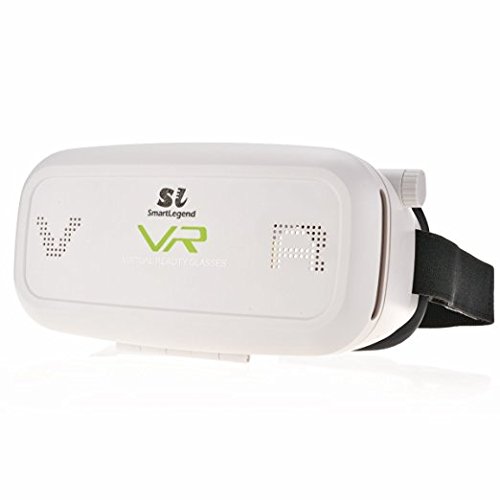
3D VR Glasses, SmartLegend VR Virtual Reality Headset for 3.5"-5.7" Smartphones Google, iPhone, Samsung, LG, Huawei, HTC, Moto - White
Product Description
3D VR Glasses, SmartLegend VR Virtual Reality Headset for 3.5"-5.7" Smartphones Google, iPhone, Samsung, LG, Huawei, HTC, Moto - White
- Fashion Design:The VR Glasses can give you a shocking 3D immersive experience with high precision and clarity. You can be free to enjoy a 3D movie or gaming anywhere at anytime! It is so cool!
- Multifunctional Design: The VR Glasses have 3 main adjustment functions. PD Adjustment for better visual feeling;Object Distance Adjustment for myopia below 600 degrees;Focal Adjustment for the best clarity.
- Suitability: The glasses are fit for iPhone, Android phones and Windows phones. Please note that the screen size is between 3.5inch-5.7inch. The max length*width of phone is 154mm*82mm.
- Adjustable Knob Strap:The glasses is attached with a durable PU leather knob strap. It is elastic and can be adjusted as per your head circumference. Comfortable and stable to wear.
- Thermal Design: We design some holes on the front cover to achieve heat dissipation. So you won't worry that your cell phone will be heated because of a long-time using.
1.Download a 3D video player on App
Please get into App download interface. Then download a video player or game software,test if it supports left-and-right split screen display and full-screen display. (suggested in WIFI environment).
Here are some VR Application Softwares for reference:
Spaceship Battle,im360,HOLO.
2. Test successfully and Play
If the video player or game software supports split screen display and full-screen display. Then you can choose a video(eg.film,TV Show) or game that you like and play it.
3.Steps to Use the Device
Step1: Gently open the adsorption front cover(as shown on the picture).
Step2: Hold the mobile phone and make screen face inwardly to you.
Step3: Place cell phone to the card slot and close the cover.
Step4: Wear the glasses and watch the video.
If you find the picture is upside down,please adjust the direction of the mobile phone.
4.Functions of Lens Adjustment(Buttons as shown on the picture)
PD Adjustment: Adjust the Pupil Distance of lens. You can adjust it according to your visual feeling. The adjustment button is shown on the picture.
Object Distance Adjustment: The function is mainly fit for myopia. But it only adapt for myopia of below 600 degrees.
5.Compatible with different sizes of smart phone
The VR Glasses is fit for 3.5-5.7 inch smart phone.
Technical Specifications
You might also like
Women's Chunky Platform Comfort Orthopedic Wedge Walking Shoes Fashion Knitted Breathable Lace Up Lug Sole Casual Non-Slip Running Shoes With Arch Support (White, Adult, Women, 9, Numeric, US Footwear Size System, Medium)
Power Steering Pump Fits For VW Golf III 1H1 1H5 Passat B4 3A2 3A5 Vento 2.0L 2E ADY AGG 1H0145155A

Katia Glitter Case Compatible for Fujifilm Mini 9 / Mini 8 Instant Film Camera with Rainbow Strap (Ice Blue)
Cameron Sino 1000mAh Battery Compatible With TomTom Go 1000, Go 1005, Go 1000 Live, 4CS0.002.01, Go Live 1005, Go Live 1000, and others
Hanging Mount Bubble Aquarium Fish Glass Vase Tank Plant Home Decoration 16x10cm Set10
Belly Dance Exotic Tribal Fringe Belt , Belly Dance Hip Skirt, Tassel Dancing Scarf (Leopard)

ST PLNE CUTTER 2IN

Mishimoto MMINT-FIST-14G Performance Intercooler Compatible With Ford Fiesta ST 2014+ Gold